I posted on Facebook a week or two ago asking for blog topic suggestions. Someone mentioned my PR-650 (or 6 needle “professional”) machine ~ an intro of sorts for any of you saving your pennies! I personally started with a Brother PE700 single needle machine, taught myself, and used it (and a 2nd machine ~ PE770D) for a good 3 years. I always said “I don’t want a big machine“. I certainly didn’t want one until I had my ‘dream’ sewing room. At the time I was in my dining room right in the middle of our foyer and den. Long story short I broke down and got a used PR600, and then soon after upgraded to a new PR-650 (August 2010). Yes, it was in the middle of our dining room until we moved in to our new house this past July where I now have the sewing room that I’m forever trying to decorate…. I haven’t looked back and have loved every minute of using it! Now they have the PR1000 coveted 10 needle, but honestly I’ve never needed over 6 needles on a single applique. Not that a brand new 10 needle wouldn’t be nice, but I’m perfectly content with my PR650.
This is a very brief overview, as I only took pictures today while monogramming a simple hand towel for Sissy’s bathroom. I will try to work on an APPLIQUE post using the 6 needle soon. I recommend seeing a dealer or your local sewing/embroidery store ~ I got a demo and a short lesson before I bought mine. And, I’m posting about the Brother machine because that’s what I have! I’ve owned 4 Brother machines so that is all I know. Babylock is similar (BMP) and I’m sure there are other brands/machines out there!
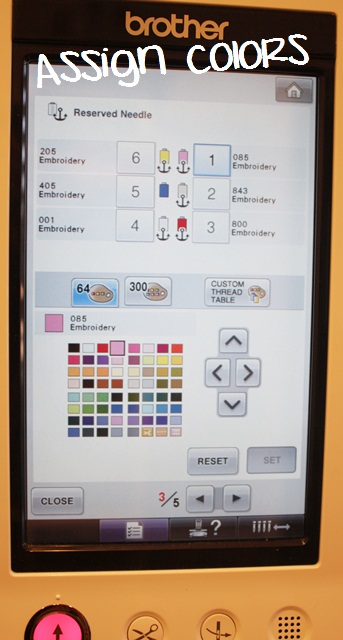
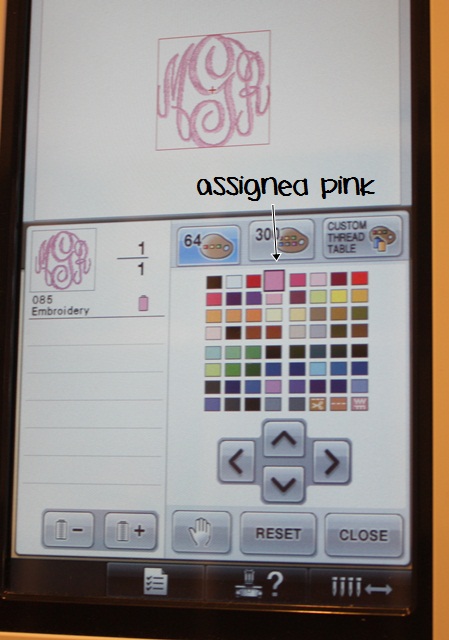
First of all, you obviously have 6 needles on this machine = 6 spools of thread capability, so when you put your spools of thread on your machine, you need to assign the colors of each thread to the respective needles. The anchor (see below) means that color is “set” on the needle. The machine will not allow you to anchor all needles ~ one is always left “free” and will be your default needle if you happen to program in the wrong color, or if you don’t program in your colors at all. It will default to that needle. I usually keep white and black on my machine and one of those is that non-anchored default needle. A little confusing I know! I just chose the closest color from the 64 choices (color chart) below. You just have to remember which color you programmed, because when you load your design you’ll have to assign the right colors. I don’t know that all people assign colors each time they change out their thread, but I do (for each and every design). This tells my machine that light pink is on needle 1, taupe is on needle 2, red is on needle 3, etc. This might make a little more sense down below. (p.s. later you’ll see black thread is actually on my needle 5, but since that needle is not anchored it doesn’t really matter that it says blue.)
p.s. These screens are all touch screens, so you simply press the buttons on the screen and press the colors you want (the squares are really tiny too so it can be tricky). My used PR500 was NOT totally touch screen so you had to use the arrows to move around to the different colors, then SET.
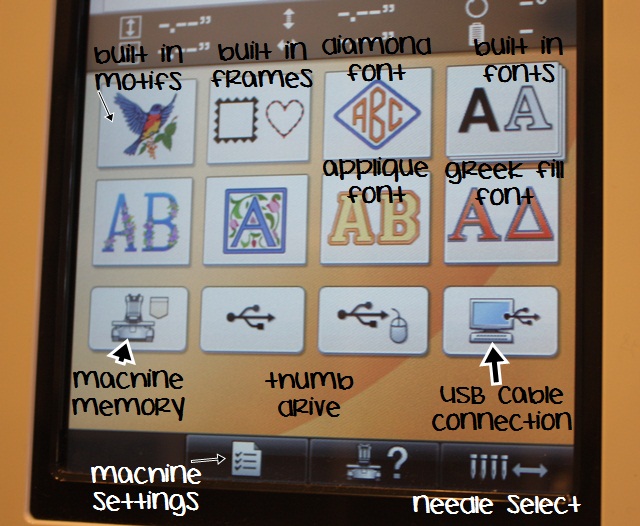
Here is the HOME MENU below. I don’t use the machine fonts or motifs that often (the diamond font on occasion), so I basically use the lower right button which brings up any designs I’ve saved to my machine via my USB cable cord, which connects my computer to my machine. When I have a design on my computer (in Sew What Pro or Monogram Wizard Plus) I save to the E: drive which is my machine. It puts it “inside” that folder (the lower right folder). I only save designs ON my machine (machine memory button) if I’ve loaded a design but want to wait until the next day to sew it. In that case I might save it to my machine memory and would then press that lower left button to retrieve it. You can also use a thumb drive but I use the USB cable cord connection.
Bottom of the picture – you can see the button you press for all machine settings – looks like a check sheet (this is where I assign colors to my needles). Other settings (and there are 5 “pages” of settings): chose background color of your screen (mine is white), screen saver time, lights – off/on, etc. (like I said, 5 pages of settings) This is also where you can see what your machine time is ~ hours of sewing time on your machine, total stitch count, etc. 99% of the time I ONLY click this button, go to page 3, assign my colors to my needles and that is IT.
Bottom right – needle selector. Press this and it will show you needles 1-6. You can move back & forth to whichever needle you need to (to thread each needle, etc). This is used when threading needles when you change thread colors.
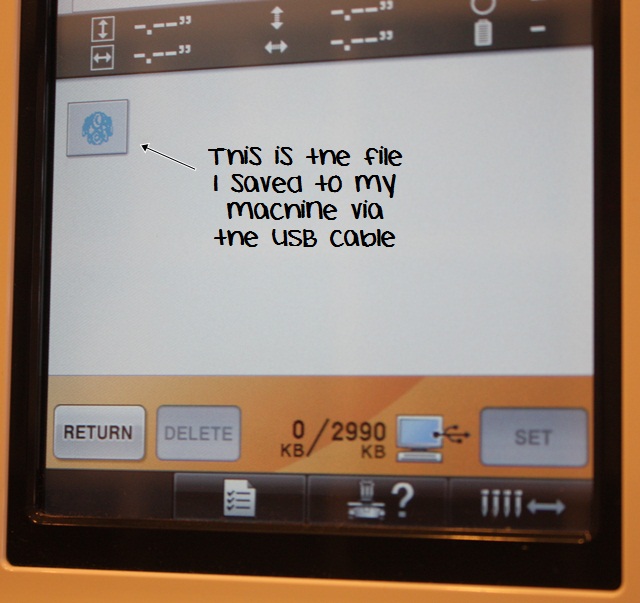
So I’ve pushed the button to retrieve my file saved to the machine via my USB cord, and I’ll select the monogram file (Mallory’s initials) and press SET.
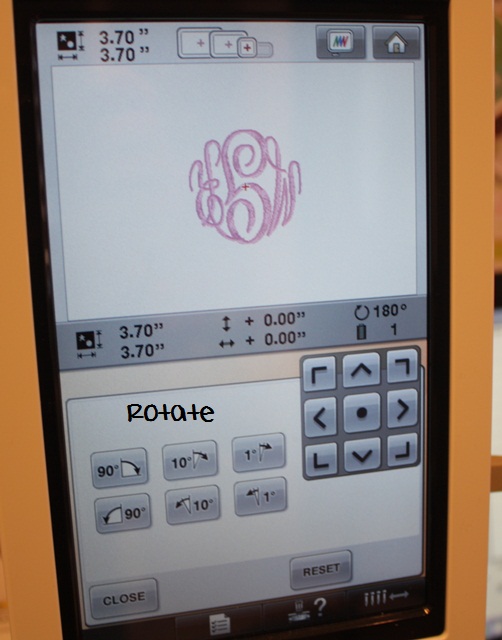
The file (monogram) is ready to edit. I can adjust the SIZE (most machines will adjust 10-20% smaller or larger), ROTATE (90 degrees, 10 degrees, etc), MIRROR IMAGE (flip flop the design) and most importantly – COLOR! You also may notice ADD, DELETE ~ you can add in a design, etc. Since I do all of my “work” on my computer (Monogram Wizard Plus or Sew What Pro), I do not use this feature. The arrows on the right are used to move the design around, and I guess you’d use this if you merged in something else. I don’t use the arrows at this point.
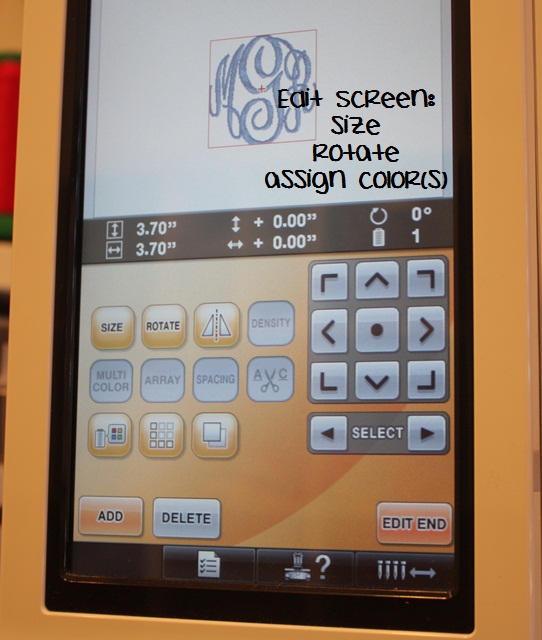
I’ve selected the COLOR button (looks like a spool of thread w/ the 4 color squares). Since this is a monogram it’s 1 color/1 step. If it were an applique, there would be a list of steps and colors to assign. I select pink – the SAME pink I assigned to my needle #1. Remember, if you select a different shade of pink, the machine will default to that unanchored needle, which is probably black or white on my machine. The good news is, your machine will warn you before you start that a color is assigned that is not assigned to a needle IF YOU PAY ATTENTION!! I have left the room and sewn the wrong color before! Again, if I were doing an applique, I would assign step 1, then press the “+” to go to the next step and assign the next color and so on and so forth. When you’re done press CLOSE.
** You might also notice the HAND button. This is used when doing applique ~ if you want your machine to stop before a step, then you press the HAND! I would program stops in between the steps so I’m able to lay my fabric down, trim my fabric, etc. If you don’t program any steps, the machine will NOT stop!
I hooped my towel and wanted to monogram upside down so the towel excess hangs to the front of the machine, so I rotated the design 90 degrees. (When the hooped towel is placed on my machine, it’s upside down, so I want to monogram it upside down.)
When you are ready to sew you’ll see this screen. After all the editing you’ll press EDIT END. You can then move the needle around to line up with the center of your garment. You will also see below your needle is assigned to pink, needle 1. If this were an applique you would see a list of colors and steps! You can also see to the right my computer screen with the monogram on it in Monogram Wizard Plus. P.S. This is Master Circle MWP alpha pak 14 font – LOVE it!
I’m ready to sew, so I would then press the LOCK button to unlock the needles, then START on my machine!

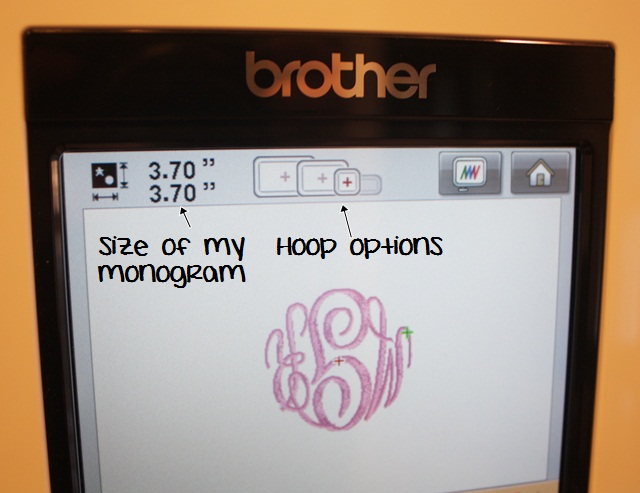
Top of screen ~ the size of this monogram is 3.70″ x 3.70″ and you can see it shows you which hoops you can use. I’m using the 4×4, but you could use any of the bigger hoops too. The hoop looking button shows you what your design looks like IN THE HOOP ~ there is actually an image of the hoop and your design in it on the screen. The HOUSE is the HOME button!
Here’s a shot of the thread ~ they are intricately run through all of the guides and tension knobs. When you change thread, an easy shortcut is to tear or cut the old thread off right at the spool, put the new spool on, tie the old & new thread (ends) together in a knot and then pull the thread through the guides/knobs and then rethread the needle. Pulling the old thread will pull the new thread through since they are tied together. Huge time saver! I’ll try to take a picture of that next time too.
Tension ~ there is an excellent video at www.sewingmachine.com on how to do a tension test, which is a feature of the machine. Once your tensions are right, there is no need to adjust them. I rarely ever fool with the tension knobs! The only maintenance I do on this part of the machine is the occasional cleaning and dusting ~ wax from the thread sometimes builds up on the guides (alcohol and a Qtip will clean them off – the guides are the silver sticks you see) and also dust can build up or get under the clips.
Any piece of lint can cause the machine to not work properly!! Your machine might stitch a few stitches and then STOP and tell you to check your upper thread and bobbin thread. It’s important to keep the machine clean and dusted.

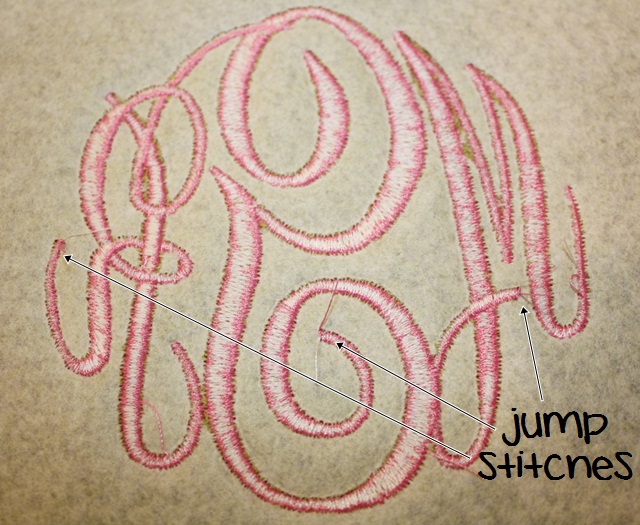
Now… I’ve sewn my towel and this is the finished product! I used iron on tearaway stabilizer on the back and solvy on top!
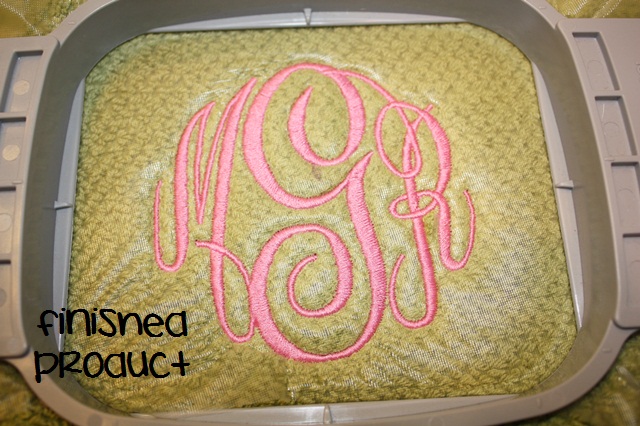
My FAVORITE thing about this machine is that it clips jump stitches UNDERNEATH the item! A major time saver!!
This was a very basic overview of the machine! I’ll try to do an applique post on the 6 needle soon! There are other features of the machine that I simply don’t use or I forgot to cover. It’s a little different doing an applique too (mainly programming in ALL of the thread colors and programming in the stops so the machine will stop). I will work on that post soon! If you have any other questions, please comment and I’ll address them next time!
This all may seem confusing or complicated, but I promise it is super easy and once you get the hang of it you will wiz through all of the steps in lightening speed! I can now set it up for an applique with my eyes closed!
My “PROS” of this machine:
- Of course, being able to use 6 needles and 6 thread colors at once! I remember changing thread on my single needle machine for every color of an applique. I could do it in my sleep, but having the option of 6 colors is great!
- Clipping the jump stitches underneath! Huge time saver ~ sometimes small embroidery jobs (small names, etc) jump from one letter to the next w/out clipping, but for the most part you can do a monogram or a name or applique and not have to clip a single jump stitch!
- Very low maintenance ~ other than keeping it dusted and clean, there is very little maintenance! If your tension is off, you simple adjust the knobs. If your tension is off on a single needle machine, it usually means a trip to the shop! On these machines you can usually make all adjustments yourself. It’s recommended you get your machine serviced every so many hours of sewing time.
Please email me with any questions or comments! BTW, this machine came from Sewingmachine.com! AND… if you know any short cuts that I am not aware of, please share! This is how I learned the machine so this is how I do things!
I never use the anchor feature to change the thread colors. I always go the the sewing screen and switch my needles to represent the colors that are on my machine. Does that make sense? I do use Monogram Wizard so sometimes I have to change the color of my thread on the edit screen. I also use Sew What Pro and change my colors in there, before I put it in my machine. I have the PR-650 and the PR-1000. LOVE them both. If you are looking for a new machine and can afford the PR-1000, go for it!!!
I’ll have to see what you’re talking about next time I’m on the machine. The way I do it is how I learned it, so it’s super easy to me!
Hi there,
I have been looking or the above font script for my towels and was wondering what font you used for your towels. And where you found it..
Thanks
Rose
It’s Monogram Wizard Plus “Master Circle”. Similar to Empire!
Katie, I have a PR1000 and a newbie. Really having a hard time understanding the whole color assignment thing. I love the machine but confused. Rosemary’s way seems simple but on the 10 I really want to understand what I am doing. Do you know of a video or tutorial?
Check http://www.sewingmachine.com under videos. I’m not sure if Steve has done a video on color assignments. I bet if I ask him he will!
Rosemary, Thank you so MUCH! I went to the sewing machine site and YES they do have a video on how to assign colors on the PR650 which I can adapt to my PR1000. It is so HELPFUL! Going up to my machine and try it out right now! You did such a wonderful job with this entry on your PR650. You are a gift to all of us! Many thanks!
THANK YOU!
I am so glad that you did this! The FedEx truck just dropped off a 2011 PR-650 CE today! I can’t wait to use it but I am a little apprehensive! Going from a 1 needle home machine to this is a big difference! I hope the Manual is very detailed! Thanks again!
When I first got mine I stared at it for a few days. I was so afraid to turn it on!!
When i got mine i was SO excited, I had been to the creative stitches exhibitions here in Devon UK for 3 years and drooled over the pr 600 & 650’s, then I finally I bit the bullet in oct this year when i went to the exhibition on my own for the first time…… I always had someone on my shoulder going, oh but will you make your money back…oh its a lot of money… blah blah blah before…shopping on my own… never the best thing…. BUT i bought it, its amazing and YES You can make you money back on it. I too stared at it for about a week, my brain hurt trying to figure it out, but its actually REALLY easy Mine is in my kitchen.. (we have a big kitchen) and its like my fourth child!! Love it Buy one, they are GREAT!!!
LOVE this! I have been thinking of getting a professional machine for a while and this is so helpful! A MUST for me is the jump cutter – ours has it but it’s such a pain. When you use it after a few clips it gets gummed up and makes a mess. I have a $6K Viking home embroidery machine that I love but it’s not meant to be run as hard as I need to run it…so we are saving for a new one. I have heard a few people have had this machine and really love it. Would you mind if I asked a general price range that these run?
I honestly don’t know! I would call a dealer and ask. I traded in the used PR600 and also got a great deal since I do a lot of advertising for them! I think it varies from dealer to dealer too and depends on Brother.
I live in Texas and just priced the 6 needle with cap hoop and fast frames 7800.00
Great post (as always!) what program are you using to create the lettering?
I use Monogram Wizard Plus (www.needleheads.com)
I have a question, I am getting ready to do a Mardi Gras embroidery design which has 50,175 stitches on a 100 % cotton tee shirt, I would like to know how you would hoop it and what backing would you use. I love your designs I buy alot of them from you. I also have A PR650 machine and love it. I would appreciate any feed back. Thanks.
I typically use medium cutaway, but with that many stitches you might consider using 2 layers?
I do what Katie does, I never use the anchor feature. Seems like your doing an extra few steps to me that are not necessary. But I know too, it’s easy to just stick to what you learn! I’m one of those kind of people too. I hate changes!
I love this machine, I had the 700 before the 650, too. The 650 was so easy to use. I bought it, had one quick (10 minute) lesson in the store, brought it home and was terrified I was going to do something wrong. My dealer told me to just play with it.
I only used my 700 for a few months before my husband blessed me with the 650. Wasn’t he a sweetheart!
Love your blog!
b
I need to figure out what y’all are doing differently! 🙂
Hi!!
I want a PR-650 now! It sounds amazing! I got a PE 770 for Christmas and am so excited to learn the machine and begin monogramming outfits for my 10 month old son, Jude. I’ve already purchased a bunch of appliqués and filled designs from your website. I was wondering if you had suggestions for where to find reasonably priced long all and short all blanks so that I may do this?
I appreciate your help so much!
In the Recommendations tab on my blog there should be a list of blanks websites!
Thank you so much! I just got a pr650, and your blog has already helped me a lot! I’m confused when I use my fast frames about how to find the middle. Getting things straight on my bags, shirts, etc. is my biggest challenge. Also, what speed do you normally run your machine? Mine stitches better at about 500. Do you cover your machine? Lots of questions!!! Thanks so much for doing a terrific blog! I love everything about it!
I find the center of the bag and mark it. Then I stick the bag to the sticky stabilizer on the fast frame – line it up with a seam or strap or whatever. I then line up my start needle with the center mark on the bag and it’ll center the design. I usually run my machine on 900 spm. No I don’t cover my machine! I use it almost daily and it didn’t come w/ any type of cover so I leave it uncovered.
Thank you so much!!
I really have enjoyed your blog, they have been very helpful. I am a self-taught sewer and just this past summer started appliqueing. I have the very basic machine, but I am saving up for the 6 needle. I do t-shirts and burps and bibs. I went to a local flee market and did not sell a thing and I have been apprehensive about going again.I was hoping this would turn into something more. How did you get started?
I emailed my friends and family and told them I was going to start doing some embroidery. I also started a blog where I could post pictures of what I had done! Facebook came later, but it also a great tool.
Rosemary…THANK YOU!!! I was one of the people requesting helpful lessons on the PR650. I have so busy that I had not checked the blog to see the tutorial. I have owned and still use the Bernina Artista 730 as well as other versions of Bernina for years and the larger machine was scary to say the least. I have had the PR650 for almost 6 months and so sad to say I have only stitched one sample. I do many tshirts (seasonal) and wanted the machine yet found that my immediate work demands over ran my desire. I could just set down and operate the Bernina without thinking. I’m just now down to learning the ins and outs of the PR650. I know I will love it I’m just going to have to cut the strings from the familiar and dive in. Can’t wait for the tutorial on the applique. My one sample was an applique and I was told by a seasoned user to use the hand method to assign needle color to stop between steps …to think through the applique using your color chart and steps that are necessary: outline, stitch down, trim, stitch around, etc. Here comes Easter so I hope to be up and working smoothly very soon. Thank you again, love all of the help….it only builds your own business with repeat pleased customers.
Rosemary-
Thanks for you blogs! I love reading them!!! I have learned a lot from them. I also have a Brother PR-650 and I looooove it! I was glancing over old post … & I was reading the one that you talk about software. I have the BES lettering software & Design Masters. I am thinking about expanding and digitizing logos & creating my own designs. I have played around with it … & I have a general idea but I am not quite sure how to perfect it. Do you think you could do a blog on digitizing?? But for right now I have one question- I have the program that converts my .pes files to .jpeg but I haven’t figured out how to add a fabric image to the final pictuer? How do you get your images to have the fabric? I hope that makes sense ….
Thanks again!!!! You are awesome!
I’m not sure how to add fabric to the picture – it may be Photoshop or something? My husband does the actual digitizing and I don’t think we want to do a post on it. There are so many applique websites out there ~ we’d have all kind of competition!! 🙂
You are sooo right … I thought I would ask.
Thanks!
Monica
I need to add appliques to some t-shirts that I want to put red hearts on, can you tell me the best way to hoop the t-shirts so they won’t be puckered. Every t-shirt ends up being puckered.
If you look under Helpful Posts, there is a brief post on hooping.
I have PR650e and an a newbie. Do you know of way to stop a colour from stitching. I am embroidering a border onto white fabric and the design shows up all the white background stitches which add an extra 30 minutes onto the time. It is a set border with PE Design and cant seem to auto punch it.
Thank you in advance
I’m not sure if I understand what you are saying?? Email me rosemarygulledge@appliquecafe.com!
Hi, I am focusing on monograms and want to do the monogram with the larger center initial. I see that you use SewWhat Pro and Monogram Wizard Plus. What is the main difference between the two and why do you use both?
MWP comes with fonts built in (like 55+ of them) plus you can add to it with other fonts (MWP fonts only). You type in the initials, pick the font, size, etc. It’s super easy! SWP is used mainly for merging. You can merge bought fonts together but it’s more time consuming and you are more limited b/c those bought fonts only come in certain sizes, whereas MWP fonts are totally sizable.
I’m looking around at machines to make my own designs, rather than depend on the pre-loaded designs that come with the machines. Do you have software than allows this with the PE-650?
Are you wanting to digitize? I have a PR650.
Hi, I just purchased a Brother PR 650. I noticed that a couple needles have skipped stitches. I did what the manual said to correct the problem but it is still doing it. Can you give me any suggestions on how to correct this. Thank you so much.
I have never had that happen? I would contact the dealer maybe or store where you purchased it.
Hi Margaret.
Did you sort your problem out?
was it just thread tension problems?
regards.
Michael
I just wanted to let you know that your tutorials are AWESOME!!!!!! I just purchased the Babylock BMP-9 and have been at a loss 🙁 Your tutorials have been so helpful that I actually just finished stitching out my first shirt thanks to your help.
Keep these very helpful tutuorials coming!!!!!
Hi Rosemary! Your posts are sooo helpful. I have had a dream to get going into this (applique) and am tired of paying everyone else to do this for me. I am not the most experienced sewer and see that you have gone through several machines. Do you think the PR 650 is manageable and easy to learn for a first machine? I really think I want a 6 needle but want to make sure I am not getting in over my head. What do you think?
It’s a very easy machine to use, I think. If you are a beginner, the other things that you have to figure out are stabilizers, hooping, etc. Those things are probably more difficult to get the hang of than the machine!
Interested in purchasing pr-650. How long did it take to stitch the monogram design in the above post? Looking for something that will show the time for stitching 3-letter monograms, etc. Thanks!
It depends on what speed you have the machine on. It’ll stitch 1,000 stitches per minute, but I usually keep mine on 800-900 depending on what I’m doing. You would LOVE the PR650!
How often do you recommend getting the PR650 serviced? After how many hours and how many stitches? I’m still kinda new to mine and wasn’t sure. LOVE your blog! Thank you for always giving us great tips & tricks!
Let me ask my sewing machine guy! I can never remember but I think it’s by sewing hours.
I’ve been lurking for mos & appreciate your insight so much! I just ordered my 65e0 & am anxiously awaiting the call that it’s in stock!! I’m upgrading from a Singer Futura SES 2000 which came with all software…. I taught myself & have worked this baby out, but I’m ready to expand. My biz is primarily monograms, do you think the MWP is sufficient? I know the brother’s in built fonts are not sufficient & I like the fonts & alpha paks in MWP (wish I could pick & choose to only get the ones I’ll use to minimize dollars spent lol) Is MWP a keyboard program? Have you tried their Alpha Baker add on? Supposedly it allows you to use TT fonts within the program. Also, for appliqués, is there a program needed for those or are they transferred via USB stick? Sorry to be so long winded, I’m trying to get my ducks in a row & this lettering uncertainty is giving me a headache!
Thanks for you wisdom!!
Lisa
I would recommend MWP and also Sew What Pro if you plan to do any merging (name + design, etc). I have not tried Alpha Baker. I use MWP 99.9% of the time on all my fonts b/c it is so much easier to use. Yes it’s keyboard so type in the name or initials, then play around w/ fonts, size, boldness, etc.
What is the difference between the PR600 and PR650? I’m debating on which to buy. I found a great deal on the PR600 ($5300), but I don’t want to get it and regret that I didn’t pay more for the 650. Thoughts?
The PR600 is just an older model! There is also a PR620 in between 600 and 650.
WOW…A LIFE SAVER..THANK YOU MORE THAN YOU WILL EVER KNOW.
Do you have (or use) a tutorial for how you clean out and dust your machine? Mine is doing that “stitch a few stitches then stop” thing and I KNOW it’s because of the dust!
I do have a post on this for a 6 needle. NOt sure what you have?? You are right – when something goes wrong w/ stitching it’s always dust!! https://www.appliquecafeblog.com/6-needle-maintenance/
Ohhhhh WOW I am considering getting a PR650 for my birthday next month the price tag is scaring me but I can get in interest free pay off deal soooooo I am 85% convinced!!
I have found a used PR650 that has only been used as a demo in a sewing shop & the dealer is asking $6000. Does that sound like a great price to you? I told my hubby it is a great price & he said to ask other people that do appliques what they think. I soooo want this machine. I currently use a single needle Bernina 430 that I would sell to help cover the cost of the new machine if any of your fans are interested:)
I would check w/ another dealer maybe and ask. I am not familiar with used machines enough to know what a good price is. I would also see what a new one would cost just to compare!
Hello there, I have a question and I have tried to solve it so many times but I need help. I am new to embroidery and I purchased the PR650 E from Brother a couple of weeks ago and I have been reading and teaching myself, but I have been trying to monogram a letter on a placemat and I would like for it to be big. So I hoop the largest hoop that came with my machine but it will not allow me to enlarge my letter. It is set on the largest hoop but I am not sure what I am doing wrong. Please help me, maybe explain to me how to set my hoops so that I will know if I am doing it correctly.
Thanks a million
Susan
Where did the letter come from? Is it a machine font or other?
Hello Rosemary,
I am looking at trading my PE500 brother embroidery machine in at Kens Sewing Center. He has a PE780D which has a 5 x 7 frame. My plan is to do personalizing and appliqueing. I was wondering what your thoughts would be on the size of frame. Will I be happy with a 5 x 7 frame for that type of work? My dream embroidery machine is the PE650. That may be a couple of years. Thank you in advance for your opinion.
5×7 is what I use a lot! I was also limited to that the first few years b/c I had a PE machine as well. I rarely use the huge PR650 hoop but you CAN buy Durkee hoops which are bigger (6×6, 9×9, etc) and I use those a lot.
Your information is so helpful- I have had a new Brother Pr655 for a few months- still nervous- any tips on doing initals on the Charles Rivers Raincoats – such as fast frame? stabilizer?
Also how do you set your machine to do the basting stitches. I not sure if this is what I need but I bought what I thought was basting stitch from MWP – it down loaded in the motif area- how do you use that?
Thanks for your help!
I am wanting to embroider on these rain jackets, I can’t find any information online. Can you help me? What type of stabilizer, do you leave the mesh inside, etc? Thanks
I would use a tearaway stabilizer and a water soluble on top. You just need to make sure the jacket is flat and smooth! Is there a way to get inside the mesh? If not I would leave the mesh.
I just got the PR650 this weekend and these tutorials have been so helpful! I feel like my learning curve was cut in half! I learned to applique reading your blog on my little SE-400, upgraded to a 770 and had to bite the bullet and get a machine meant to handle the volume I’ve been throwing at it.
When you hoop a t-shirt do you hoop with the bottom to the front or back? It’s a no brainer on a single needle, but I haven’t found a position yet that makes me feel like it’s not going to get sucked up in the needle!
I hoop with the neck of the shirt on top, so the arm goes inside the neck. You just have to be sure all is clear!!
I have pe design and use the cord to transfer to my machine. But I just bought monogram wizard and can’t figure out how to get it to the machine. I am sure it is simple but at this point it is just collecting dust. Any help is appreciated.
Can you import it through PE Design? I am not familiar w/ PE Design so I don’t even know what it does!
Hi Rosemary,
I wondered if you could lend some advice.
I am a stay at home mom of 4, ages 8,8,5 & 3 and I am blessed to homeschool them.
I am a creative crafty person from a line of family entrepreneurs and am looking for a way to use my
creativity & make some extra money doing/making things I really enjoy. Also my children would love to
have a fun way to help mommy.
Do you have to be a great seamstress to work these embroidery machines?
I am looking at purchasing a Brother 6 needle or 10 needle and wondered your thoughts.
Should you go new or used for better price. Would the 10 needle be necessary or extravagant?
Where would a good place to start be on learning how, etc.
Any help/advice would be greatly accepted and I thank you ahead of time?
Hi! First, you do not have to be a seamstress!! I took 1 sewing class and can barely sew a straight line! I would say a Brother 6 needle would be all you need to start out. Getting a 10 needle would be starting at the top and it would be a little harder to recoup your investment I think. It’s rare that I need more than 6 needles to do any 1 project. As far as new vs used, if you can afford new, then go for it. That way you know what you are getting! There are great used machines out there too. It’s really just a matter of how much you want to spend to start out. Other start up costs are embroidery thread, stabilizers, fabric, tools (scissors, etc) and of course applique and embroidery designs, software, etc. Most people start w/ a single needle machine, but if you have the money and this is what you want to do, a 6 needle is what you will want eventually. There’s lots of info on my blog!
Thanks so much!
I think I will try the 6 needle since you don’t even use more than 6, I bet I wouldn’t.
Your blog has so much great information & will be a great resource while I start this journey.
God Bless & Merry Christmas!
Ann Marie :0>
You may have already Answered this but how often do you service your machine? I got mine in August and had an error code a few days ago about main motor encoder signal and completely stopped working! Total freak out! I eventually started it back up but slowed the stitches down. When I talked to the repair guy he said there was no way a new machine could have that problem already, unless it had 10mil stitches already. Sure enough, I have over 10 mil. He said it probably just needed maintenance. How do you maintain yours? Thanks!
My machine guy says every 18 mos, or every 400-500 hours on the machine!
Rosemary,
I wanted to see if I could ask you a couple of questions. I also have a new PR 650 and am just getting started with it. I worked with a PE770 for quite some time, but recently upgraded. I’m working on embroidering a windbreaker for a co-worker and want to do a natural circle using Monogram Wizard Plus.
Here are my questions. First, how can you make the letters “puffier” almost like you see on baseball caps, etc., just not quite as thick?
Second, I seem to always have a problem with the stitches “pulling” on the fabric, even when using the old PE770. Is this a problem with the machine, the fabric, the hooping, or something else? When I say “pulling” I mean tightening up on the fabric so that the holes is leaves behind are, in my opinion, too large.
Thanks for any help you can give, and even though I’m a Bama fan, “War Eagle” for a 5th straight state of Alabama National Champ!
I think there is foam you buy to make the puffy letters? I have never tried them. What kind of needle are you using? You might try Solvy on top?
Thanks! We found the puffy foam and have ordered some to give it a try. We have a hat hoop coming in soon and are anxious to try it out.
We use the 75-11 Schmetz needles. I like to use fast frames wherever I can, so I’m thinking that I should hoop where I can using double stabilizer when able.
Love your blog and website. I would love to find a used brother 6 needle embroidery machine. Any suggestions on where to look?
Thanks so much!!
I would check w/ http://www.sewingmachine.com – you may have to call them. They are located in Atlanta!
I am a new Brother PR655 owner – It may just be holiday hangover but I can’t figure out how to change the needles. I need to do 6 shirts and want to Change needles – anybody have any video suggestions? I’m going to try the manual and a flashlight again.
Well heck! It’s an Allen wrench thing – I was looking for a regular screw – ADD move of the day. On to sewing!
Ha!!
I used to try to change the needle with the hoop still attached…..so much easier to just take it off and get it changed faster !
How do I check the hours and stitch count on my PR-650 ? My manual doesn’t have it/ or I cannot find it!
Click the button by your LOCK button which looks like a piece of paper w/ checks and lines on it. Go to page 5 (use the arrow at the bottom) and it shows you trip count, total time, etc.
is there any way to know the best number of stiches if i transfer a picture to the pr1000e software? because sometimes it become less or more
Hi, I can’t seem to find anywhere that advises when my PR650 should be serviced – after so many stitches? so many hours? etc? Would you have any idea?
Many thanks,
Tom
Sewingmachine.com says every 18 mos or every 400-500 hours on the machine meter.
Hi. I have recently purchased the PR-655. I have trouble with the thread continually breaking for some reason. It happens on different designs and I have changed needles with that specific thread, but yet it usually still happens. It seems that thread gets caught in the front part somehow before you thread it through the next to last hole (orry, not sure what it’si actually called.)
Have you ever experienced this and do you have any suggestions?
Thanks so much,
Dawn
Does it happen while sewing the design?
Hi everyone,
I just bought a pr655 and am def a newbie. I want to know if there is a way to stitch with just one needle on the machine? I havean applique design made in wilcom but because the intro software has so many limitations, the brother machine recognized each letter as a separate color. Someone suggested to just see with one needle. How do I do this??? Please help. Thanks!!
If the thread colors are different, your machine will recognize each color as a different step. So if you have a name w/ 5 letters and each letter is programmed as a different color, it will want to change needles. You would need to program your colors in so that the name or letters are all the same color. Does that make sense?
There is an easy way to do it using PR650. Your machine manual describes this in one section called “Uninterupted embroidering (using a single color)”, page 133. Go look into this.
Hi there! LOVE reading your stuff. I have a question. I have the pr 650 and can’t figure out how to calibrate it. All of a sudden this evening it isn’t stitching centered and for some reason my bobbin thread is showing thru on the top but not in every stitch just here and there but enough to make it look awful and like it’s skipping stitches. I’ve tried loosening and tightening tension but nothing is working!!
Not sure about calibrating it – turn it off and back on and make sure all of the screws are tightened (frame)?? As far as bobbin thread showing you can do a tension test and also clean out your bobbin area and dust around the machine knobs and pieces to make sure there’s not dust or something making it skip stitches.
I have a similar problem,but only when i’m doing bags. My bobbin thread comes thru on the top and i’ve ruined 3 bags already. It doesn’t come thru when i’m doing towels, only bags where I don’t use the under and overlayer. I’m using fast frames. I’ve dusted but maybe not enough and I’ve done a tension test.Please help me I’m desperate!
THANK YOU! THANK YOU! THANK YOU! You just made clear for me an ongoing question I have about assigning thread colors. I’m a good manual reader but wasn’t “getting it”.
I have a Brothers PR-1000e and I am trying to learn how to do puff letters on hats. I have the puffy foam to place on first but would like to know if I need to change the thread density so that it’s not to tight. If I need to do that, how do I go about doing it.
I LOVE your blog! this is my GO TO site for any questions I have. I have a quick question….I have a PR650, but I have the BES Lettering 2 software. I’m wanting to make headbands and do a running stitch around the letters. Do you know how I can do a running stitch border? Thanks!
I have a Brother Pr 600 and thinking about getting a Pr650. Does the hat hoop I have for the PR600 work on the Pr650?
Thanks!!
Marshelle
PS: Love you Blog!!
I think the cap frame is compatible with all the multi needle machines, but I would double check w/ a dealer!
I’ve been reading your blog and it is very helpful!! I have a PR655. I’m having problems with it leaving a “loop” at the end of stitches when completing the tie off stitch. It is doing this on the pre-programmed fonts, as well as the tension check stripes, etc. I just purchased it in late August. Have you ever heard of this? I took it in to have it serviced and when I got it back home it was still doing it…so frustrating!!! Thank you for your all the information you share with the rest of us!
Additional Information on tie off stitch problem: when you pull the loop the last 5-10 stitches unravel.
So is it not tying off at all?? There is a button on the sewing screen that you need to make sure is selected. Can you email me at rosemarygulledge@appliquecafe.com Ruthie?
Love your blog, anything I enter in google and there you are. it’s been super helpful on helping me to learn to maintain my wife new pr650. I just followed your directions and cleaned it and replaced the bobbin case as it seamed like I couldn’t get the lower tension consistent. 4 bobbins later and 16 sets of tests strips and I am sick of it. now I was getting some bobbin thread showing thru but now the width of the test strip varies in thickness.
It’s late, maybe a fresh start on day 3 will help.
Just wondering what’s the difference between a PR 650 and the PR 655…
PR655 is probably a newer model!? Not sure what the difference is. Could be a feature or two that the 650 doesn’t have.
Hi Rosemary,
I have a 650 which I have had for several years and now all of a sudden it wants to sew outside of the frame. I am using the 4″ frame and it centers if I use needle #1 but any other needle sews waaayyyy off to the left. Luckily I noticed it was off before I started sewing or I may have had a serious repair.
Pam
Just had it serviced and it was a sensor, don’t think they replaced it just adjusted it maybe. I had already tried to calibrate it and it didn’t work. Out of curiosity what do most of you pay to have your PR650’s serviced , no repair work.
Pam
Rosemary,
I have the PR1000e and have both of the locking stitch buttons engaged. On most designs, its great. But, on a circle block monogram, the stitches are coming lose between letters. It’s like they don’t lock. What should I do? Any tricks?
Is it a machine font or a bought font?
bought font. The machine doesn’t come with circle block.
I’m thinking about buying a PR-650… About how much do they run? Also do you know anyone who has the Janome MB4? I was looking at that machine also. thanks!:)
I have no idea what the price is on the PR650. I think it depends on where you purchase it, what the store decides to throw in with it, what specials Brother may be running, etc. Where are you located? You could contact http://www.sewingmachine.com and request a quote! Does the MB4 only have 4 needles? If I were going to be spending the money, it would be worth it to me to get 2 more needles. Most applique designs use more than 4 colors, but I rarely use more than 6. 6 is great!! Or 10 if you really want to spend the $$! 🙂
I live in Lafiite, Louisanna, just south of New orleans.. Yes the MB4 has 4 needles it is 6k and has 0% financing. I checked my local store and they only sell the new Pr 655 brothers it is 12k and comes with all kinds of stuff, I would rather just the machine.12k is kind of a lot of money for me.lol I have a soft wear i use embrilliace and i love it very user friendly..so u think sewing machine.com would be my best bet?
It would not hurt to try Sewingmachine.com! I would definitely call around!
I called them they was very helpful and gave me a great price thanks so much!!
Awesome!! If you ever talk to Steve, tell him I referred you! 🙂
I purchased a PR 650E about a year ago and love it. I had no prior history with machine embroidering and have basically taught myself how to operate it. I recently have been working with mini fonts and I am having problems aligning them accurately horizontally. I thought placing all the letters the same using the veritical placement (especially the words above the center line) then the words would be aligned accurately. It did not work. It has been very difficult trying to place the mini fonts accurately. I have no issue with the full size letters. Hoping you have some suggestion.
Thank you so much
Diane
Are you using software??
Does anyone else have trouble with needle #4 not wanting to sew? Seems to be very frequent for me.
Try wrapping the thread on needle 4 around the tension knob TWICE! Works for me!!
Thanks Rosemary, I just saw this. I am having trouble with the #4 needle again so I am going to try your method. I appreciate your help.
Yes, I took my machine into the store several months ago for problems with the number 4 needle they told me to clean it. I have done that several times and now that it is out of warrantee they want $349. For just the labor to fix it. Of course they knew the sensors were going out on it but it was still under warranty so if they waited a little longer I would have to pay for that.
HI All
Just found this page
loads of info
Question
what is the recommended servicing hrs on these babies??
I have twin PR650’s
This is what Steve at Sewingmachine.com recommends:
Service at least every 18 months or 400 – 500 hrs on the meter.
However, I went longer b/c I keep my machine clean and taken care of and I don’t sew 8 hours a day! 🙂
i relly need your help with my pr650 machine . the total stich counter is about the fill all the digits and i dont now whats happend after, and i am scary to b stocked in the midle of a job. please if you have any info letme now-
Regards
I honestly have no idea! I would call any Brother dealer and just ask what happens when it’s full! You could call sewingmachine.com and they could tell you.
I have a 655e-Brother. I’ve had it about 18 months. The bobbin has started showing through and nothing I do affects it. I’ve put in a new bobbin, rethreaded, cleaned under the needle place, adjusted the bobbin, put in a new bobbin case, put in a new needle, arghhhhhhh!!!! Any ideas? I’m doing a child’s shirt, cutaway. I also tried it with WSS on top. Thanks!! I’ve adjusted the top tension, but it doesn’t seem to change.
I was going to suggest adjusting the top tension. Have you done a tension test??
hi
I have been running a Brother PR620 now for 3 to 4 years before that I used to use a Janome MB4 not very impressed with the Janome but would recommend a brother 6 or 10 needle machine to anyone. 12 years ago I had a spinal accident and well I had to find something to do, my mother used to have a sewing and knitting shop and I spent a lot of time there after school and in the holidays, and rely enjoyed it. now I am retired from full-time employment I spend my time doing patterns and Embroidering and very relaxing past time. If there is any help I can give I am always available and will help with information if I can.
so many thanks
Steve
how much is this machine?
have a new Brother PR655E– got in Jan. 16– wondering how to find the total stitch count that my machine has on it– on my designio 820E it is easy touch the button looks like sheet of paper and scroll to it- gives service count and total stitch count. — I can’t seem to find that info on my new machine the 655E.
On mine, you click the button w/ the sheet of paper on it w/ a checklist (checks & lines), then go to page 6 for that info!
I am using BES software and am doing an applique word. I want to spell out the entire word first, to actually view the lettering and width on my practice fabric before sewing. My program wants to applique a complete letter first. How can I accomplish this? I have tried to adjust the moving parts but I am not successful.
thank you.
Hey there.
I just recently purchased a used PR650 and am wondering if someone could tell me how to center an entire design. I have a PR650e, and there is a button that allows me to center designs, but this particular button isn’t on this 650 I just bought. Thanks in advance!
Do you mean there is a button on the PR650e that will automatically center the design for you? I have an older PR650 and I mark my center on my item, then line up my lead needle with that center. I know some of the new machines have lasers and lights and such, so not sure that is what you are talking about?
I have myself so confused about assigning colors and I can’t wrap my head around it. I might just need to sleep on it and try again in the morning!!!
i just about have gone blind i have read every post, lot o f my questions have been answerd, i have just got a brother pr 655 embroidery machine, i got all sizes of the new ez durkee frames, i really want to try them. what do you do with the straps on the bags when your embroidering , just let them hang down ??? and does my machine center up the pattern on the frame i don’t want a needle hitting the frame, please could you please send me a email answer, i want to start useing it right away thank you
OCT. 15, 2017 11 ;20 PM
I usually let the straps hang down, but just make sure they will not get caught up in the arm/needle! You will need to move your lead needle to the center mark on the bag before you start. Unless you hoop perfectly centered, you’ll need to line the needle up before you begin. Also, check your borders to make sure nothing will hit!
I need help with assigning colors on my Brother PR655 or should I say not assigning colors. I can’t seem to figure this out. Is there a way to just put your spools of thread on the machine in the order of sewing sequence without assigning a color to the needle? I hope this makes sense.